

How can I find my E-number on MyEIU?
Your E-Number is your unique student ID number issued when you are admitted to EIU.
Incoming Students | Current Students | Current Employees
Incoming (Applied/Admitted) Students:
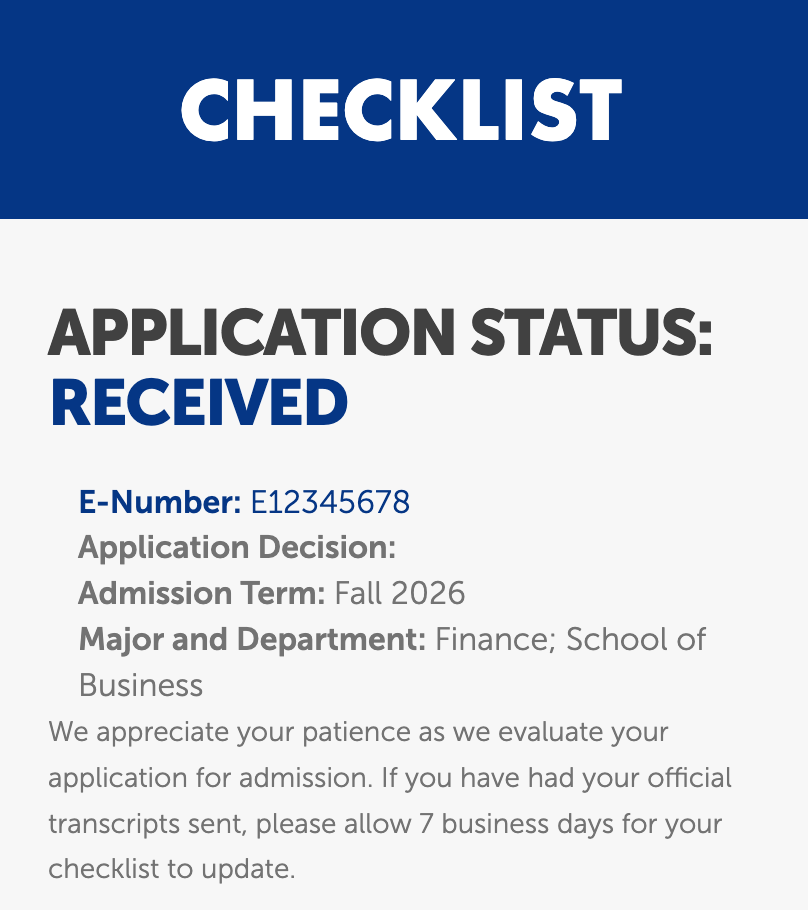
- Log in to your MyEIU checklist page at eiu.edu/myeiu.
- The number directly below your admissions status at the top of the page is your E-Number.
Current Students:
- Check your Panther Card for the 9-digit number starting with "E"
- Find it in PAWS:
- Login to PAWS.
- Click the Student tab at the top of the page.
- Click "Student Profile"
- Your E-Number will be at the top of the page, after your name.
- Go, in person, to the Office of the Registrar with photo identification
- Email a picture of your photo ID along with a request for your E-Number to records@eiu.edu.
Current Employees:
- Login to PAWS.
- Click the "My Profile" button next to your photo.
- Your E-Number will be under your name and photo.